SSO ID – Rajasthan SSO Login, Registration & Portal Guide
राजस्थान SSO पोर्टल से जुड़ी हर जानकारी अब एक ही जगह, आसान हिंदी भाषा में
Everything you need to manage your SSO ID in one place. This guide walks you through SSO Login, SSO Registration, and password recovery on the official RajSSO portal, so you can start using Rajasthan SSO services like e-Mitra, scholarships, land records, and pensions without confusion.
What is SSO ID? (Rajasthan Single Sign-On)
SSO ID stands for Single Sign-On Identity, a unique digital credential issued by the Government of Rajasthan that lets you access the entire SSO Portal ecosystem using just one username and password. Instead of creating separate logins for every government website or scheme, your SSO ID acts as a master key: register once, and you’re connected to dozens of state services, from certificate applications to pension tracking, scholarship forms to land records.
The SSO Portal itself, accessible at sso.rajasthan.gov.in, is managed by the Department of Information Technology & Communication, Government of Rajasthan, as part of the state’s broader push toward digital governance. Every citizen, business owner, and government employee in the state can register for an SSO ID and use it to interact with public services online, without needing to visit a government office in person.
SSO ID Rajasthan – Hindi में जानकारी
SSO ID राजस्थान सरकार द्वारा जारी की गई एक विशिष्ट डिजिटल पहचान है, जिसे एक बार SSO Portal (sso.rajasthan.gov.in) पर पंजीकरण करके प्राप्त किया जा सकता है। एक बार अपनी SSO ID बन जाने के बाद, आप एक ही लॉगिन के ज़रिए राज्य सरकार की 100 से अधिक सेवाओं का लाभ उठा सकते हैं, जैसे e-Mitra, जन आधार, छात्रवृत्ति, भूमि रिकॉर्ड, और पेंशन योजनाएं। यह सुविधा नागरिकों के लिए समय की बचत करती है और अलग-अलग वेबसाइटों पर बार-बार पंजीकरण करने की ज़रूरत को खत्म करती है।
Key Benefit of SSO ID
The biggest advantage of having an SSO ID is convenience through consolidation. Rather than juggling multiple usernames and passwords across different departmental websites, a single SSO ID login unlocks the full range of services hosted on the SSO Portal, including employment services, health scheme enrollment, business registrations, and grievance redressal. This reduces password fatigue, cuts down on repeated data entry, and makes it far easier for citizens to track and complete government-related tasks digitally, from home or on mobile.
How SSO Fits into the Larger State Portal Ecosystem
The SSO Portal doesn’t operate in isolation. It’s the central authentication layer that connects citizens to the wider network of services listed on the official Rajasthan State Portal (rajasthan.gov.in). While the State Portal serves as the general gateway to government departments, schemes, and information, the SSO ID is what actually lets you log in and transact, applying for a certificate, checking pension status, or submitting a form, across those connected department websites. In effect, the State Portal tells you what’s available, and your SSO ID is what lets you actually use it.
About the Rajasthan State Portal (rajasthan.gov.in)
What is the Official State Portal?
The State Portal, hosted at rajasthan.gov.in, is the official digital front door to the Government of Rajasthan. It brings together information and access points for the state’s administration, departments, schemes, and citizen services under a single umbrella website. Rather than searching for each department’s website individually, residents, businesses, and government staff can use the State Portal as a starting point to navigate toward the specific service or department they need, including the SSO Portal, which handles login access to transactional services.
Governance Structure (Governor, CM, Departments)
Rajasthan’s state government follows the standard structure used across Indian states. The Governor serves as the constitutional and ceremonial head of the state, currently Haribhau Kisanrao Bagade. Real executive authority rests with the Chief Minister and the Council of Ministers, currently led by Chief Minister Bhajan Lal Sharma, supported by Deputy Chief Ministers Diya Kumari and Prem Chand Bairwa.
Below this leadership, the state runs more than 80 departments, covering areas like agriculture, education, health, water resources, forests, home affairs, and finance. Each department manages its own schemes, notifications, and services, many of which are surfaced through the State Portal and made accessible through the SSO Portal login system.
Role as Gateway to Government Services
The State Portal functions as a directory and access layer rather than a place where transactions themselves happen. Its main role is to help citizens discover relevant departments, schemes, notifications, and connected platforms, then guide them toward where the actual service is delivered. For anything that requires logging in, whether applying for a certificate, checking a scheme’s status, or submitting a form, the State Portal directs users toward the SSO Portal, since that is where secure, authenticated access to services is actually granted through a person’s SSO ID.
Who Can Create an SSO ID?
Citizen Eligibility (Jan Aadhaar / Google / Facebook)
Any resident of Rajasthan can complete SSO Registration as a citizen. This is the most common category, and the Rajasthan SSO Portal offers several ways to verify identity during signup. Citizens can register using their Jan Aadhaar number, which links directly to their family ID records, or they can sign up through an existing Google or Facebook account for a faster, simplified process. Once verified, the citizen gains full access to services like scholarships, land records, pension applications, and utility bill payments through their new SSO ID.
Udyog (Business) Eligibility (BRN / Udyog Aadhaar)
Business owners and industry operators in Rajasthan fall under the Udyog category during SSO Registration. To register, they need either a Business Registration Number (BRN) or an Udyog Aadhaar number, both of which confirm that the business is formally recognized under state or central government records. This pathway on the Rajasthan SSO Portal allows business owners to access services related to licensing, GST filing, industry schemes, and other commerce related government interactions, all tied to their single SSO ID.
Govt. Employee Eligibility (SIPF ID)
State government staff register under a separate category built specifically for employees. To complete SSO Registration as a government employee, applicants need their SIPF (State Insurance and Provident Fund) ID along with its associated password. This verifies their employment status within the state government system. Once registered on the Rajasthan SSO Portal, employees can access employee-specific services, including salary and provident fund details, service records, and other internal administrative tools tied to their government role.
SSO Registration – Step-by-Step Guide
Completing SSO Registration on the RajSSO Portal is a quick process that takes only a few minutes, regardless of whether you’re registering as a citizen, business owner, or government employee. Below is a simple walkthrough of each step.
Visit the Official RajSSO Portal
Start by opening your browser and navigating to the official RajSSO Portal at sso.rajasthan.gov.in. On the homepage, look for the “Registration” option, usually placed near the login form. Clicking this will take you to the registration page where you’ll begin the signup process.
Select Your User Category
Once on the registration page, you’ll be asked to choose the category that applies to you: Citizen, Udyog (Business), or Govt. Employee. This selection determines which identification method you’ll use next, so pick the one that matches your actual status.
Enter Your Identification Details
Depending on the category selected, you’ll need to enter specific details to verify your identity. Citizens can use their Jan Aadhaar number or sign in through Google or Facebook. Business owners will need to provide their Business Registration Number (BRN) or Udyog Aadhaar number. Government employees will enter their SIPF ID and password. This step confirms that you’re eligible to hold an SSO ID under the category you chose.
Verify via OTP
After submitting your identification details, an OTP (One-Time Password) is sent to your registered mobile number. Enter this 6-digit code on the portal to confirm your identity. This step adds a layer of security and ensures the account being created is genuinely linked to you.
Create Your SSO ID & Password
The final step is setting up your login credentials. Choose a unique username for your SSO ID and create a strong password, ideally combining uppercase letters, numbers, and special characters. Once submitted, your registration is complete, and you can immediately use your new SSO ID to log in and start accessing services on the Rajasthan SSO portal.
SSO Login – How to Login to RajSSO Portal
Once you’ve completed SSO Registration on the RajSSO portal, logging in is a quick, straightforward process. Here’s how to complete your SSO ID Login each time you want to access Rajasthan SSO services.
Open the Rajasthan SSO Login Page
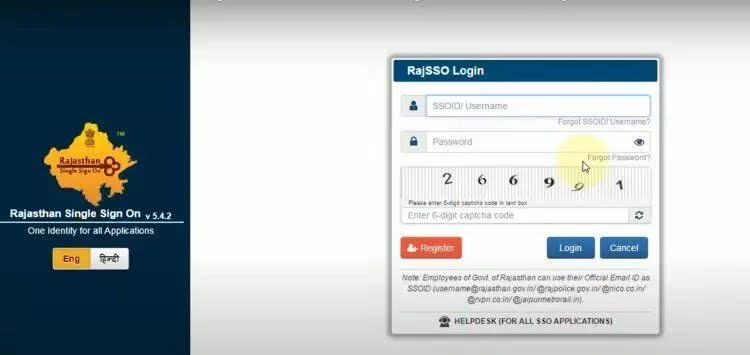
Start by navigating to the Rajasthan SSO Login Page at sso.rajasthan.gov.in/signin. This is the official page where all SSO ID Login attempts take place, so make sure you’re on the correct, verified URL before entering any credentials.
Enter Your SSO ID & Password
On the login page, enter your SSO ID & Password in the fields provided. These are the credentials you set up during SSO Registration, so double check for typos, especially with case sensitive passwords, before proceeding.
Enter Captcha & Click Login
Next, fill in the captcha code displayed on screen to confirm you’re not a bot. Once entered correctly, click the “Login” button to complete your SSO Login and land on your Rajasthan SSO dashboard, where you can access all connected government services.
Security Tip for SSO Login
Before entering your credentials, always confirm that the URL shows sso.rajasthan.gov.in and ends in a genuine .gov.in domain. Never share your SSO ID Login details with anyone, and avoid entering your password on any site that looks unfamiliar or slightly different from the official RajSSO portal. Staying alert to these small details helps keep your account and personal information secure.
Forgot SSO ID / Password? – Reset Guide
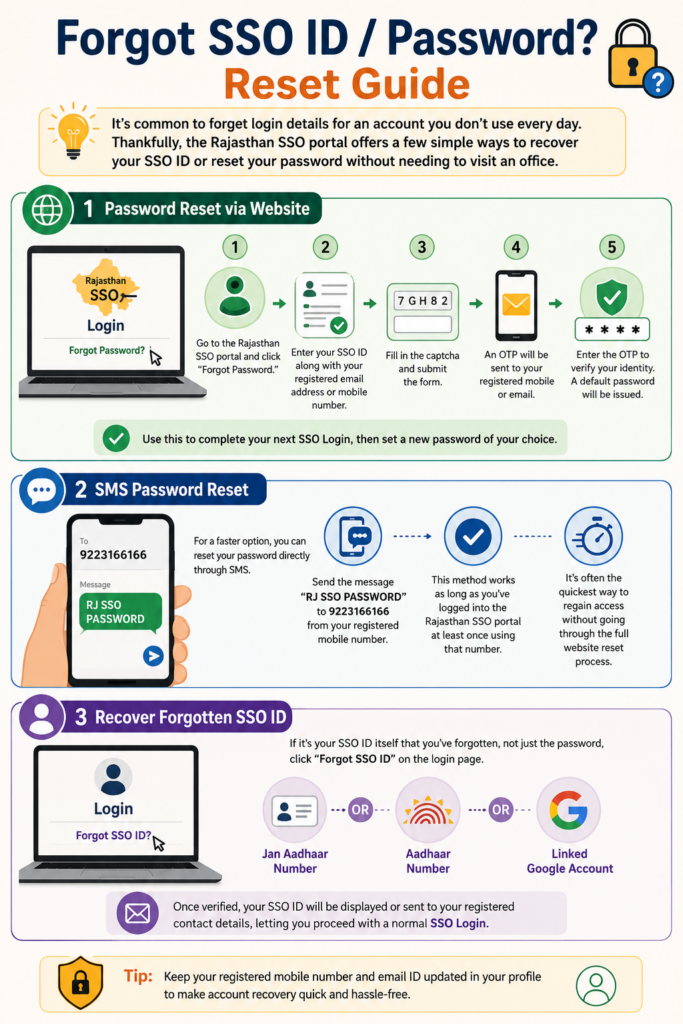
It’s common to forget login details for an account you don’t use every day. Thankfully, the Rajasthan SSO portal offers a few simple ways to recover your SSO ID or reset your password without needing to visit an office.
Password Reset via Website
If you’ve forgotten your password, go to the Rajasthan SSO portal and click “Forgot Password.” You’ll be asked to enter your SSO ID along with your registered email address or mobile number. After filling in the captcha and submitting the form, an OTP will be sent to your registered mobile or email. Enter the OTP to verify your identity, and a default password will be issued. Use this to complete your next SSO Login, then set a new password of your choice.
SMS Password Reset
For a faster option, you can reset your password directly through SMS. Simply send the message “RJ SSO PASSWORD” to 9223166166 from your registered mobile number. This method works as long as you’ve logged into the Rajasthan SSO portal at least once using that number, and it’s often the quickest way to regain access without going through the full website reset process.
Recover Forgotten SSO ID
If it’s your SSO ID itself that you’ve forgotten, not just the password, click “Forgot SSO ID” on the login page. You can recover it using your Jan Aadhaar number, Aadhaar number, or a linked Google account, depending on how you originally registered. Once verified, your SSO ID will be displayed or sent to your registered contact details, letting you proceed with a normal SSO Login.
Services Available on Rajasthan SSO (RajSSO) Portal
Once you’ve completed your SSO ID Login on the RajSSO portal, you gain access to a wide variety of services spanning nearly every part of daily government interaction. Here’s a look at some of the most widely used ones available through Rajasthan SSO.
e-Mitra
One of the most popular services connected to the portal, e-Mitra allows users to pay utility bills, apply for birth, death, caste, and income certificates, and complete dozens of other everyday transactions online or through a nearby kiosk.
Employment Exchange
This service connects job seekers with government and private job openings across the state, along with application tracking and recruitment notifications for various government positions.
Scholarship Portal
Students can apply for state government scholarships, check application status, and receive updates on new scholarship schemes as they become available.
Land Records
Also known as Apna Khata, this service lets citizens view and download land ownership records, check mutation status, and manage other property related documentation online.
Pension Services
Covers old age, widow, and disability pension schemes, allowing eligible citizens to apply for benefits and track disbursement status without visiting a government office.
Jan Aadhaar
Used for family ID enrollment and updates, Jan Aadhaar links household information to a single family identity card, which is also used as a verification method during registration.
Chiranjeevi Health
This is Rajasthan’s health insurance scheme, giving enrolled families access to cashless medical treatment at empanelled hospitals across the state.
Rajasthan Sampark
A grievance redressal platform where citizens can lodge complaints related to any government department and track the resolution status of their concerns.
BPAS
Short for Building Plan Approval System, this service handles online submission and approval of building plans, useful for property owners and construction related permissions.
GST Portal
Provides access to GST registration and filing services for business owners who need to manage their tax compliance through the state system.
Arms License
Allows citizens to apply for or renew an arms license online, streamlining a process that traditionally required multiple in-person visits.
e-Learning
Offers access to online education and skill development resources, supporting students and job seekers looking to build additional qualifications.
Other Key Citizen Portals Linked from rajasthan.gov.in
Beyond the SSO Portal itself, the State Portal connects citizens to a few standalone platforms that serve specific purposes outside the standard login-based services. These portals are worth knowing about separately, since they each have their own distinct function within Rajasthan’s digital governance system.
Jan Soochna Portal (Transparency/RTI)
The Jan Soochna Portal is designed around the principle of proactive transparency. Rather than requiring citizens to file a formal Right to Information (RTI) request, this platform makes information about government schemes, department budgets, and welfare programs publicly available upfront. Citizens can browse details on eligibility, benefits, and scheme status without needing to log in, making it a useful complement to the more transactional services offered through the SSO Portal.
Rajasthan Sampark (Grievance Redressal)
Rajasthan Sampark functions as the state’s centralized grievance redressal system. It gives citizens a single point of contact to lodge complaints related to any government department, whether that’s a delayed service, an unresolved issue, or a general concern. Complaints can be submitted online through the portal or via a dedicated call center, and users can track the status of their grievance until it’s resolved. This service is also accessible as one of the options within the broader SSO Portal ecosystem.
e-Mitra Standalone Portal
While e-Mitra is available as a service inside the SSO Portal, it also operates as its own standalone platform and physical kiosk network across the state. Through e-Mitra, citizens can pay utility bills, apply for certificates like birth, death, caste, and income documents, and complete a wide range of everyday government transactions. For residents without regular internet access, e-Mitra kiosks located in local markets and government offices offer an in-person alternative to completing these same services digitally.
Rajasthan SSO Portal – Quick Reference Table
| Detail | Information |
|---|---|
| Portal Name | Rajasthan Single Sign-On (RajSSO) |
| Official Website | sso.rajasthan.gov.in |
| Login Page | sso.rajasthan.gov.in/signin |
| Registration Page | sso.rajasthan.gov.in/register |
| Managed By | Department of Information Technology & Communication, Government of Rajasthan |
| Beneficiaries | Citizens, Business Owners (Udyog), Government Employees |
| Total Services | 100+ e-Governance Services |
| Registration Fee | Free (No charges) |
| Toll-Free Helpline | 1800 180 6565 |
| Helpdesk Phone | 0141-5153222 / 0141-5123717 |
| Email Support | [email protected] |
| Password Reset via SMS | Send “RJ SSO PASSWORD” to 9223166166 |
SSO Login Troubleshooting
“Password Expired” Error
If you see a “Password Expired” message while attempting to log in, this is usually just a routine security measure built into Rajasthan SSO, not an indication that something is wrong with your account. Click “Continue” on the prompt, verify your identity through the OTP sent to your registered mobile number, and set a new password. Once updated, you should be able to complete your SSO ID Login normally.
OTP Not Received
If the OTP needed to verify your SSO ID doesn’t arrive, first check that your registered mobile number is active and has proper network signal. If you’re expecting the OTP via email, check your spam or junk folder as well. Wait two to three minutes before requesting a new OTP, since resending too quickly can sometimes cause delays. If the issue continues, contact the RajSSO portal helpdesk for further assistance.
Portal Not Loading
If the login page isn’t loading properly, try clearing your browser’s cache and cookies, then reload the page. Switching to a different browser, such as Chrome, Firefox, or Edge, can also help, as can using incognito or private browsing mode. It’s worth double checking that your device’s date and time settings are set correctly, since this can occasionally interfere with secure site loading on Rajasthan SSO.
Account Locked After Multiple Failed Attempts
Entering the wrong password too many times can temporarily lock your SSO ID as a security precaution. If this happens, wait around 30 minutes before attempting to log in again. Alternatively, you can use the “Forgot Password” option to reset your credentials right away, rather than waiting out the lock period.
FAQs – SSO ID, State Portal & Rajasthan SSO
What is SSO ID in Rajasthan? +
SSO ID, or Single Sign-On Identity, is a unique digital credential issued by the Government of Rajasthan. It lets citizens, business owners, and government employees access more than 100 state services through a single login on the RajSSO portal, instead of managing separate accounts for each department.
How to create a new SSO ID? +
Visit the official RajSSO portal, click “Registration,” and select your category, Citizen, Udyog, or Govt. Employee. Enter the required identification details, verify via OTP sent to your registered mobile number, then set a username and password to complete your registration.
How to login to Rajasthan SSO Portal? +
Go to the login page on Rajasthan SSO, enter your SSO ID and password, fill in the captcha, and click “Login.” This will take you to your dashboard where all connected services are accessible.
How to reset forgotten SSO ID password? +
Click “Forgot Password” on the login page, enter your SSO ID along with your registered mobile number or email, verify via OTP, and set a new password. You can also reset your password by sending “RJ SSO PASSWORD” via SMS to 9223166166 from your registered number.
Is SSO ID Registration free? +
Yes, creating and using an SSO ID on the official portal is completely free. There’s no charge for registration or for accessing any of the connected government services.
What services are available after SSO ID Login? +
Once you complete your SSO ID Login, you can access services like e-Mitra, employment exchange, scholarships, land records, pension schemes, Jan Aadhaar, health insurance enrollment, GST filing, and dozens of other department specific tools, all through Rajasthan SSO.
Can I merge two SSO IDs? +
Yes, if you’ve accidentally created more than one SSO ID, the portal provides a merge option to combine them into a single account. This helps avoid confusion and ensures all your linked services stay connected to one login going forward.
What is the SSO helpdesk number? +
For login issues, registration problems, or general support, you can reach the RajSSO portal helpdesk through the toll-free number 1800 180 6565, or the regional helpline numbers 0141-5153222 and 0141-5123717.
Can I use SSO on mobile phone? +
Yes, Rajasthan SSO is fully mobile responsive, meaning you can complete your SSO ID Login and access services directly from a smartphone browser without needing a desktop computer.
Conclusion – Navigating Rajasthan’s Digital Government Ecosystem
The Rajasthan SSO portal (RajSSO) has fundamentally changed how residents, business owners, and government employees interact with the state. What once meant separate logins, repeated paperwork, and multiple office visits now happens through a single SSO ID, connecting people to well over a hundred services from one dashboard.
Whether you’re completing your first SSO Registration, handling a routine SSO Login, or troubleshooting a forgotten password, the process is designed to be simple and accessible from any device. And once your SSO ID Login is set up, everything from bill payments to pension applications, land records to scholarship forms, becomes far less of a hassle.
As Rajasthan continues expanding its digital services, the Rajasthan SSO portal is likely to keep growing, adding new departments and functions over time. For now, having a working SSO ID remains one of the simplest ways to stay connected to the state’s public services, without the friction that used to come with managing government paperwork the old fashioned way.